

One Upgrade That Changes Everything
If there’s one PC upgrade that delivers an instant, noticeable improvement, it’s switching from a hard disk drive (HDD) to a solid-state drive (SSD). Users often describe it as making an old computer feel brand new. Boot times drop from minutes to seconds, programs open instantly, and the entire system feels smoother.
But why are SSDs so much faster than hard drives?
The answer lies in fundamental differences in how they store and access data. HDDs rely on mechanical movement, while SSDs are fully electronic. That difference alone changes everything about speed, reliability, and responsiveness.
This article explains how HDDs and SSDs work, why SSDs are dramatically faster, and why HDDs are increasingly unsuitable for modern computing.
🔄 How Hard Drives (HDDs) Work
Hard drives have been around for decades, and their basic design hasn’t changed much.
Inside a Hard Drive
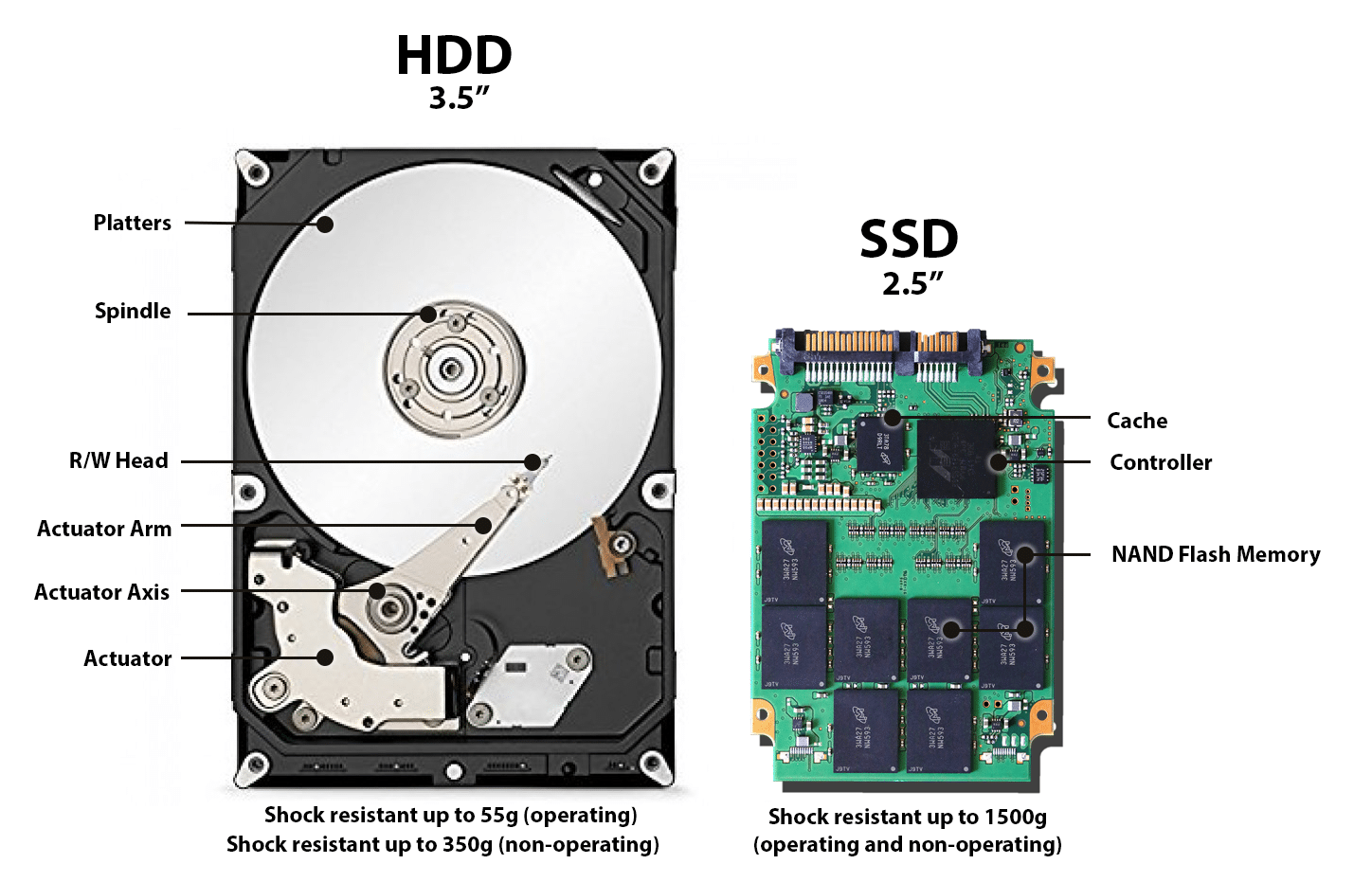
An HDD contains:
-
Spinning platters coated with magnetic material
-
A read/write arm that physically moves
-
A motor that spins the platters (typically 5,400 or 7,200 RPM)
To read or write data:
-
The platters spin to the correct position
-
The arm moves to the correct track
-
Data is read magnetically from the platter surface
The Problem with Mechanical Movement
Every operation requires physical motion, which introduces:
-
Delay (seek time)
-
Vibration
-
Heat
-
Wear and tear
Even the fastest consumer HDDs are limited by physics. No matter how fast the platters spin, mechanical movement will always be slow compared to electronic signals.
⚡ How Solid-State Drives (SSDs) Work
SSDs have no moving parts.
Inside an SSD
An SSD contains:
-
NAND flash memory chips
-
A controller that manages data access
-
Cache memory (often DRAM)
Instead of spinning disks, SSDs store data in electrical cells that can be accessed almost instantly.
Why This Matters
With SSDs:
-
No spinning
-
No moving arms
-
No waiting for physical alignment
Data is accessed electronically, similar to RAM—just slower and non-volatile (it keeps data when powered off).
🚀 The Biggest Reason SSDs Are Faster: Access Time
HDD Access Time
Hard drives must:
-
Rotate the platter
-
Move the read head
-
Wait for the correct sector
This results in access times of 10–15 milliseconds.
SSD Access Time
SSDs access data electronically with access times around:
-
0.02–0.1 milliseconds
That’s 100–500× faster access.
This difference is why:
-
Windows boots in seconds on SSDs
-
Programs open instantly
-
Games load dramatically faster
📂 Random vs Sequential Performance
HDDs Are Only “Fast” at Sequential Reads
Hard drives perform best when reading large, continuous files (like videos). But modern computing rarely works this way.
Operating systems and applications constantly:
-
Load thousands of small files
-
Jump between folders
-
Read and write randomly
HDDs struggle with this because the read arm must constantly move.
SSDs Excel at Random Access
SSDs don’t care where data is stored. Random access is nearly as fast as sequential access.
This makes SSDs vastly superior for:
-
Operating systems
-
Games
-
Software
-
Multitasking
📊 Speed Comparison (Real-World)
| Storage Type | Typical Read Speed |
|---|---|
| HDD (7200 RPM) | 100–200 MB/s |
| SATA SSD | ~550 MB/s |
| NVMe Gen 3 SSD | 3,000–3,500 MB/s |
| NVMe Gen 4 SSD | 5,000–7,500 MB/s |
| NVMe Gen 5 SSD | 10,000+ MB/s |
Even a basic SATA SSD is 3–5× faster than a hard drive, while modern NVMe SSDs are 50–100× faster in real workloads.
🧠 Latency: The Hidden Performance Killer
Speed isn’t just about MB/s—it’s about latency, the delay before data starts moving.
-
HDDs have high latency due to mechanical delays
-
SSDs have extremely low latency
Low latency means:
-
Faster response times
-
Less stutter
-
Smoother multitasking
This is why an SSD feels fast even when doing simple tasks like opening folders.
🎮 Why SSDs Matter So Much for Gaming
Modern games are built with SSDs in mind.
Games Constantly Stream Data
Open-world games stream:
-
Textures
-
Models
-
Audio
-
World data
On an HDD, this causes:
-
Long load times
-
Texture pop-in
-
Stutters when moving fast
On an SSD:
-
Fast travel is instant
-
Worlds load seamlessly
-
Gameplay feels smoother
Newer game engines increasingly assume SSD-level performance, making HDDs a bottleneck.
🖥️ Boot Times and System Responsiveness
HDD Boot Experience
-
1–3 minutes to boot Windows
-
Constant disk activity after boot
-
Programs opening slowly
SSD Boot Experience
-
5–15 seconds to desktop
-
System is responsive immediately
-
Background tasks finish quickly
The difference comes from how many small files the OS must access during startup—something HDDs are terrible at.
🔄 Multitasking: SSDs vs HDDs
When multitasking, HDDs fall apart:
-
Switching apps causes pauses
-
Disk usage hits 100%
-
System feels frozen
SSDs handle multiple requests simultaneously thanks to:
-
Parallel access to memory cells
-
Advanced controllers
-
Queue depth support (especially NVMe)
This makes SSDs ideal for:
-
Gaming + streaming
-
Browsing while installing software
-
Creative workloads
🔒 Reliability and Durability
HDD Weaknesses
Because HDDs have moving parts, they are vulnerable to:
-
Drops
-
Vibrations
-
Mechanical failure
-
Wear over time
SSD Advantages
SSDs:
-
Have no moving parts
-
Are shock-resistant
-
Are quieter and cooler
-
Are more reliable in laptops
While SSDs have limited write cycles, modern drives last many years under normal use—often outlasting HDDs in consumer systems.
🔋 Power Efficiency and Heat
SSDs:
-
Use less power
-
Produce less heat
-
Improve battery life in laptops
HDD motors consume constant power just to spin, making them inefficient by modern standards.
🧱 Why HDDs Still Exist (For Now)
Hard drives aren’t completely obsolete yet.
HDD Strengths
-
Much cheaper per terabyte
-
Ideal for large media libraries
-
Good for backups and archives
HDD Best Use Cases
-
Mass storage
-
NAS systems
-
Cold data storage
But for operating systems, games, and apps, HDDs are no longer suitable.
🆚 SATA SSD vs NVMe SSD: Are All SSDs Equal?
Not all SSDs are the same.
SATA SSDs
-
Limited by SATA interface
-
Still massively faster than HDDs
-
Great for upgrades and budget builds
NVMe SSDs
-
Use PCIe lanes
-
Far higher bandwidth
-
Lower latency
-
Best for gaming and productivity
Even the slowest SSD still destroys the fastest HDD in real-world use.
🔮 The Future: Why HDDs Are Fading Away
Modern software is built assuming:
-
Fast storage
-
Low latency
-
High parallelism
As operating systems, games, and applications evolve, HDDs increasingly become a bottleneck rather than a cost-saving option.
SSDs are becoming:
-
Faster
-
Cheaper
-
Larger in capacity
HDDs will likely remain only for archival storage in the long term.