

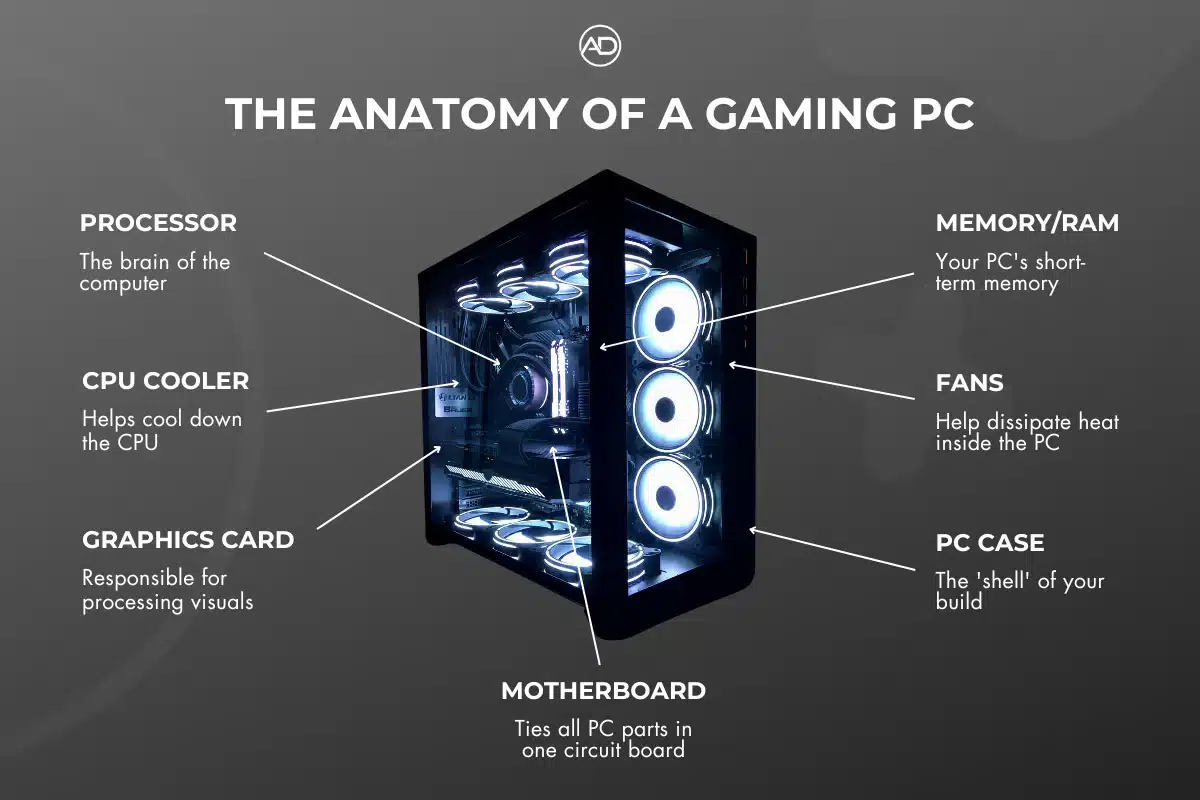
Understanding What’s Inside a PC
A modern PC may look simple from the outside, but inside it’s a carefully balanced system of components that all work together. Each part has a specific role, and choosing the right components determines how fast, stable, quiet, and future-proof your computer will be.
Whether you’re building a gaming PC, upgrading an old system, or just curious, this guide explains every major PC component, what it does, and why it matters.
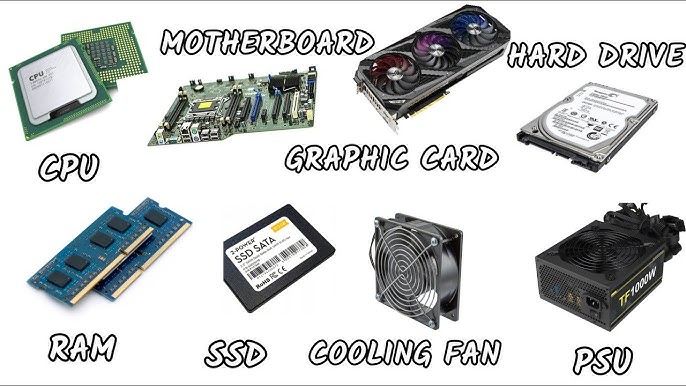
🧠 1. CPU (Central Processing Unit)
The CPU is the brain of the computer. It handles all calculations, instructions, and decision-making tasks.
What the CPU does:
-
Runs programs and applications
-
Handles game logic and physics
-
Processes calculations and system tasks
-
Manages communication between components
Key CPU specs:
-
Cores & Threads – More cores help with multitasking and heavy workloads
-
Clock Speed (GHz) – Higher speeds improve performance in games and apps
-
Cache (L3, L2) – Faster access to frequently used data
Why it matters:
A strong CPU improves:
-
Gaming performance (especially high FPS games)
-
Multitasking
-
Productivity (editing, rendering, coding)
🎮 2. GPU (Graphics Processing Unit)
The GPU is responsible for rendering images, video, and graphics. For gaming and creative work, it’s often the most important component.
What the GPU does:
-
Renders game graphics and 3D models
-
Handles video playback and encoding
-
Accelerates creative software (editing, rendering, AI tasks)
Types of GPUs:
-
Integrated GPU – Built into the CPU (basic display tasks)
-
Dedicated GPU – Separate graphics card (gaming, high performance)
Why it matters:
A better GPU means:
-
Higher FPS in games
-
Better visual quality
-
Faster rendering and editing
-
Support for high-resolution monitors (1440p, 4K)
🧠 3. RAM (Random Access Memory)
RAM is short-term memory used by your PC to store active data.
What RAM does:
-
Stores running programs and game data
-
Allows fast switching between tasks
-
Prevents slowdowns when multitasking
Key RAM specs:
-
Capacity (GB) – 16GB is standard, 32GB for heavy use
-
Speed (MHz) – Faster RAM improves performance
-
Dual-Channel – Two sticks perform better than one
Why it matters:
Insufficient RAM causes:
-
Stuttering in games
-
Slow performance
-
Programs closing unexpectedly
💾 4. Storage (SSD / HDD)
Storage is where your operating system, games, and files are saved.
Types of storage:
-
HDD (Hard Disk Drive) – Large capacity, slow speed
-
SSD (Solid State Drive) – Fast, silent, reliable
-
NVMe SSD – Extremely fast (recommended for modern PCs)
What storage does:
-
Stores Windows, programs, and files
-
Affects boot time and load times
Why it matters:
An SSD makes your PC:
-
Boot faster
-
Load games quicker
-
Feel more responsive overall
🧩 5. Motherboard
The motherboard is the backbone of the PC. Everything connects to it.
What the motherboard does:
-
Connects CPU, RAM, GPU, storage, and peripherals
-
Supplies power to components
-
Determines upgrade options
Key motherboard features:
-
CPU socket compatibility
-
RAM type (DDR4 / DDR5)
-
Expansion slots (PCIe)
-
USB, audio, networking ports
Why it matters:
A good motherboard ensures:
-
Stability
-
Upgrade flexibility
-
Proper power delivery
🔌 6. Power Supply Unit (PSU)
The PSU delivers power to all PC components.
What the PSU does:
-
Converts wall power to usable DC power
-
Protects components from power surges
Key PSU specs:
-
Wattage (W) – Must meet system requirements
-
Efficiency (80+ Bronze/Gold) – Higher efficiency = less heat
-
Quality & protections – Prevents damage
Why it matters:
A poor PSU can:
-
Cause crashes
-
Damage components
-
Shorten PC lifespan
Never cheap out on the power supply.
❄️ 7. Cooling System (CPU Cooler & Case Fans)
Cooling keeps components within safe temperature limits.
Types of cooling:
-
Air Cooling – Fans and heatsinks
-
Liquid Cooling (AIO) – Radiators and liquid loops
What cooling does:
-
Prevents overheating
-
Maintains performance under load
-
Extends component lifespan
Why it matters:
Overheating causes:
-
Performance throttling
-
System crashes
-
Permanent hardware damage
🖥️ 8. PC Case
The case houses all components and manages airflow.
What the case does:
-
Protects components
-
Controls airflow and cooling
-
Supports cable management
Case types:
-
ATX
-
Micro-ATX
-
Mini-ITX
Why it matters:
A good case improves:
-
Cooling efficiency
-
Noise levels
-
Ease of building and upgrades
🌐 9. Network Card (Ethernet / Wi-Fi)
Network hardware connects your PC to the internet.
What it does:
-
Provides wired or wireless internet access
-
Supports online gaming and streaming
Types:
-
Ethernet (most stable)
-
Wi-Fi (convenient)
Why it matters:
Good networking ensures:
-
Low latency in games
-
Stable downloads and streaming
🎧 10. Sound Card (Audio)
Most modern PCs use integrated audio.
What it does:
-
Handles sound output and microphone input
When a dedicated sound card is useful:
-
Professional audio work
-
High-end headphones
-
Studio microphones
🧠 11. BIOS / Firmware
The BIOS is low-level software that starts your PC.
What BIOS does:
-
Initializes hardware
-
Allows system configuration
-
Controls boot order
Why it matters:
BIOS updates can:
-
Improve compatibility
-
Fix bugs
-
Enable new CPUs or RAM speeds
🖱️ 12. Peripherals (Monitor, Keyboard, Mouse)
Peripherals define your user experience.
Monitor:
-
Resolution (1080p / 1440p / 4K)
-
Refresh rate (60Hz–240Hz)
Keyboard & Mouse:
-
Mechanical vs membrane
-
DPI and responsiveness
Good peripherals improve comfort and performance.
⚙️ How All PC Components Work Together
A PC is a balanced system:
-
CPU handles logic
-
GPU handles visuals
-
RAM stores active data
-
Storage holds files
-
PSU powers everything
-
Cooling keeps it stable
A weak component can bottleneck the entire system.