

Why Rendering Speed Depends on Hardware
If you work with video editing, 3D animation, game development, visual effects, or architectural visualization, you’ve likely experienced long rendering times. Rendering is one of the most demanding tasks a computer can perform because it requires processing massive amounts of visual data.
Whether you’re exporting a video, generating a 3D scene, or rendering high-resolution images, the speed of the process depends heavily on your computer hardware. A powerful system can complete tasks in minutes that might take hours on a slower machine.
Understanding how hardware affects rendering times can help creators choose the right components for their workflow and avoid frustrating delays.
In this article, we’ll explore the most important hardware components that influence rendering performance, including CPUs, GPUs, RAM, storage, and cooling, and explain how each one impacts the speed of your projects.
What Is Rendering in Computing?
Rendering is the process of converting raw digital data into a final visual output, such as:
-
Images
-
Animations
-
Videos
-
3D scenes
-
Visual effects
Rendering engines calculate how light interacts with objects, textures, and environments to create realistic visuals. These calculations involve millions—or sometimes billions—of mathematical operations.
For example:
-
A 4K video render contains over 8 million pixels per frame.
-
A 60-FPS animation requires 60 frames every second.
-
A 10-second animation requires 600 frames.
Each frame must be calculated individually, which is why rendering can take so long.
The speed of this process depends almost entirely on the power and balance of your computer hardware.
CPU Rendering: Why Processor Power Matters
The Central Processing Unit (CPU) is one of the most important components in rendering workflows.
Traditionally, most rendering engines relied heavily on CPUs because they are excellent at handling complex calculations and instructions.
How CPUs Affect Rendering Speed
CPU performance depends on three main factors:
1. Core Count
Modern CPUs contain multiple cores, allowing them to process several tasks at the same time.
Rendering software often divides a frame into sections and assigns each section to a different CPU core.
For example:
-
A 4-core CPU processes four parts of a frame simultaneously.
-
A 16-core CPU processes sixteen parts at once.
More cores typically result in faster rendering times, especially in multi-threaded rendering engines.
2. Clock Speed
Clock speed determines how quickly a CPU can execute instructions.
Higher clock speeds allow the processor to complete calculations faster, which improves rendering performance in tasks that rely heavily on single-core performance.
3. CPU Cache
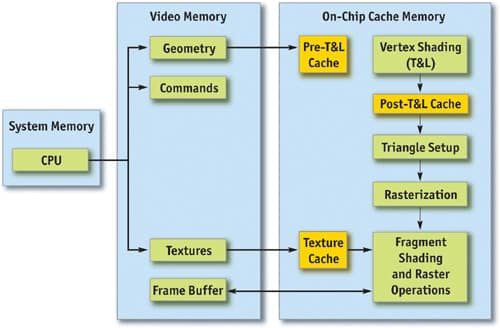
Cache memory stores frequently used data close to the processor, reducing the time needed to access it.
Larger cache sizes help speed up repeated calculations during rendering workloads.
GPU Rendering: Why Graphics Cards Are So Powerful
In recent years, Graphics Processing Units (GPUs) have become increasingly important in rendering.
GPUs are designed for parallel processing, meaning they can perform thousands of calculations simultaneously. This makes them extremely efficient for graphical workloads.
Why GPUs Accelerate Rendering
Unlike CPUs, which focus on sequential processing, GPUs contain thousands of smaller cores designed for repetitive mathematical tasks such as:
-
Lighting calculations
-
Ray tracing
-
Texture processing
-
Pixel shading
Because rendering relies heavily on these operations, GPUs can dramatically reduce rendering times.
Some modern rendering engines can complete tasks many times faster on a GPU than on a CPU.
RAM and Rendering Performance
RAM (Random Access Memory) acts as the workspace where data is stored during rendering.
When you open a large project—such as a video editing timeline or a complex 3D scene—the data must be loaded into RAM so the processor can access it quickly.
Why RAM Matters for Rendering
Rendering projects often involve large assets, including:
-
High-resolution textures
-
Large video files
-
Detailed 3D models
-
Particle simulations
-
Multiple effect layers
If your system doesn’t have enough RAM, it must use storage as temporary memory.
This process is called virtual memory or paging, and it is much slower than RAM access.
When this happens, rendering times increase significantly.
Storage Speed and Rendering Workflows
Storage speed affects rendering performance more than many people realise.
Rendering projects involve frequent file access, including:
-
Loading project files
-
Accessing textures and assets
-
Saving rendered frames
-
Exporting final video files
Using slow storage devices can create bottlenecks that delay the entire rendering process.
SSD vs Hard Drive
Modern systems use Solid State Drives (SSDs) because they offer major performance advantages over traditional hard drives.
SSDs provide:
-
Faster read speeds
-
Faster write speeds
-
Lower latency
-
Faster project loading
Using an SSD allows the CPU and GPU to receive data faster, which helps maintain efficient rendering performance.
VRAM: Why GPU Memory Matters
When rendering using GPUs, VRAM (Video RAM) becomes extremely important.
VRAM stores graphical data used during rendering, including:
-
Textures
-
Geometry data
-
Lighting information
-
Frame buffers
If a project requires more memory than the GPU has available, performance may drop significantly.
Large projects with complex textures and high resolutions require more VRAM to render efficiently.
Cooling and Thermal Performance
Rendering workloads push hardware to its limits for extended periods of time.
Unlike gaming—which fluctuates between heavy and light workloads—rendering often keeps the CPU and GPU at 100% usage for hours.
If components overheat, the system may activate thermal throttling, which reduces clock speeds to protect the hardware.
When this happens, rendering times increase.
Proper cooling ensures hardware can maintain maximum performance during long rendering sessions.
Balanced Hardware Prevents Bottlenecks
One of the biggest mistakes people make when building rendering systems is focusing on only one component.
For example:
-
A powerful GPU with insufficient RAM may struggle with large scenes.
-
A strong CPU with slow storage may waste time waiting for data.
-
Poor cooling can reduce performance during long renders.
A balanced system ensures all components work together efficiently.
Real-World Example of Rendering Performance
Consider two different systems rendering the same animation.
System 1
-
Entry-level CPU
-
Basic GPU
-
16GB RAM
-
Hard drive storage
System 2
-
High-core CPU
-
Powerful GPU
-
64GB RAM
-
NVMe SSD storage
System 2 could complete the same render several times faster, saving hours or even days on large projects.
Why Faster Rendering Matters for Creators
Rendering speed has a direct impact on productivity.
Faster hardware allows creators to:
-
Preview changes quickly
-
Experiment with more effects
-
Complete projects faster
-
Meet deadlines more easily
Slow rendering systems limit creative workflows and can delay production.